Recently I need to send a binary file to a device connected to the serial port of my PC. Under windows I can use the 'send binary file' in teraterm, how about under minicom?
The solution is simple, if your serial port is COM1:
cat [filename] > /dev/ttyS0
Or if you are using some kind of USB to serial converter:
cat [filename] > /dev/ttyUSB0
Note: The number could differ depending on your system configuration, it could be /dev/ttyUSB4 for example. To check what is the number, do a 'ls -l /dev/ttyUSB*'
Showing posts with label Linux. Show all posts
Showing posts with label Linux. Show all posts
Sunday, July 26, 2009


Tuesday, May 06, 2008
Burning CD with Ubuntu
Recently I have been using my Ubuntu machine frequently.
This afternoon I downloaded the openSolaris 2008.05 iso image. Once I got the file, burning it to a disc is as straight-forward as a few clicks. This post may seem trite to those who use Ubuntu regularly. But for me, the last time I ever seriously used Linux was almost 2 years ago and really Linux has been progressing in leap and bounds, though I have to admit due to the corporate infrastructural issue (read: old systems die hard), even 2 years ago I primarily dealt with RedHat Linux, which IMHO, sucks big time.

OpenSolaris seems promising and I will spend some time to play with it.
This afternoon I downloaded the openSolaris 2008.05 iso image. Once I got the file, burning it to a disc is as straight-forward as a few clicks. This post may seem trite to those who use Ubuntu regularly. But for me, the last time I ever seriously used Linux was almost 2 years ago and really Linux has been progressing in leap and bounds, though I have to admit due to the corporate infrastructural issue (read: old systems die hard), even 2 years ago I primarily dealt with RedHat Linux, which IMHO, sucks big time.

OpenSolaris seems promising and I will spend some time to play with it.
Monday, May 05, 2008
Flip-Side of Embedded Linux
Since the inception of Linux way way back (in Internet time, that is), it has generated a lot of fan-hood and excitement. Finally after ages of Windoze-ism and when-do-you-crash-today-ism, Linux offers a viable alternative to the highly geeky mass.
Embedded devices are always a group by themselves because of three main constraints: power, memory, and 'closeness to hardware'.
The last item demands some explanation: Most embedded device will feature some non-standard peripherals. It could be a special memory-mapped region for retrieving of network packets, an external I2C bus on which the CPU talks to an FPGA, or even just a FIFO where the north CPU talks to the south CPU (yes, 2 separate CPUs, not dual core, no, not north bridge and south bridge). Therefore in embedded system there are a lot of work that involve interfacing and talking to the bare metal. You just can't avoid those like what you deal on regular PCs. Ok, I lied, this kind of work exists for all known computing devices, just that they are taken care of by poor firmware engineers like Cuppa.
"But my company's embedded device runs [your favorite OS] and engineers still don't need to care about the underlying hardware!", you may retort. Well, there are two possibilities to this. First, your company most probably has outsourced the firmware development (buying so called the board support packages which take care the low-level stuff). Second, the design your company has is based on a reference platform where again most of the dirty work has been done for you. It could be a linear combination of 1, 2, or both. However I will argue that no matter case 1 or case 2, any serious embedded software work will open the can of worms and someone eventually needs to take care the low-level details. The question is just who and when.
Linux becomes favorable because all source codes are open and free (both as in beer and speech). With source code in hand, the engineers can prune and trim according to need. This seems like a dream come true: We got something cool, and it is free!
Like everything in life, there are always down-sides for Linux. In fact, there are quite significant weakness in Linux-based embedded solutions.
First of all, beside the Linux core kernel, you need a fair number of software modules to get the system up and running. Note that these software modules are usually maintained by different people and the quality variation is significant. No worry, there are companies that sell this kind of solution, say solution from manufacturer X, they say they have an 'integrated, pre-test' solution on one 'open source development platform'. So far so good, you bought solution X version N (XvN), implemented your product on top of it, and it is good to go. Perfect, but this is actually the easiest part of the whole development cycle.
The horror starts when you get past the software release and enter maintenance phase. Note that XvN you bought earlier represents a snap-shot of the open source landscape some time ago, and worse still, due to stability and testing purpose, company X usually will not source the latest source code from the said software modules. In other words, don't expect your XvN to contain the latest features, bug fixes, and security fixes.
On top of the problem XvN is obsolete right after it is delivered, there is a problem where feature changes in new release break some other software in the system. Recall that the underlying modules are maintained by different people/organizations, even though the maintainers of key modules will exercise certain cautions when doing modifications, there is no official coordinator to draft out a system plan to ensure backward compatibility and coherency for _your_ system. Therefore there is no guarantee the newer release of a key module will continue to work for your system or even XvN. It is far not uncommon to have a system completely fall flat on its face when doing a minor upgrade because a subtle change in package functionality. Did I mention some package maintainers just disappear or give up the software and you are left with a year 2000 version of package XYZ?
This post is inspired by this post. Read it, if you are very into Linux.
Embedded devices are always a group by themselves because of three main constraints: power, memory, and 'closeness to hardware'.
The last item demands some explanation: Most embedded device will feature some non-standard peripherals. It could be a special memory-mapped region for retrieving of network packets, an external I2C bus on which the CPU talks to an FPGA, or even just a FIFO where the north CPU talks to the south CPU (yes, 2 separate CPUs, not dual core, no, not north bridge and south bridge). Therefore in embedded system there are a lot of work that involve interfacing and talking to the bare metal. You just can't avoid those like what you deal on regular PCs. Ok, I lied, this kind of work exists for all known computing devices, just that they are taken care of by poor firmware engineers like Cuppa.
"But my company's embedded device runs [your favorite OS]
Linux becomes favorable because all source codes are open and free (both as in beer and speech). With source code in hand, the engineers can prune and trim according to need. This seems like a dream come true: We got something cool, and it is free!
Like everything in life, there are always down-sides for Linux. In fact, there are quite significant weakness in Linux-based embedded solutions.
First of all, beside the Linux core kernel, you need a fair number of software modules to get the system up and running. Note that these software modules are usually maintained by different people and the quality variation is significant. No worry, there are companies that sell this kind of solution, say solution from manufacturer X, they say they have an 'integrated, pre-test' solution on one 'open source development platform'. So far so good, you bought solution X version N (XvN), implemented your product on top of it, and it is good to go. Perfect, but this is actually the easiest part of the whole development cycle.
The horror starts when you get past the software release and enter maintenance phase. Note that XvN you bought earlier represents a snap-shot of the open source landscape some time ago, and worse still, due to stability and testing purpose, company X usually will not source the latest source code from the said software modules. In other words, don't expect your XvN to contain the latest features, bug fixes, and security fixes.
On top of the problem XvN is obsolete right after it is delivered, there is a problem where feature changes in new release break some other software in the system. Recall that the underlying modules are maintained by different people/organizations, even though the maintainers of key modules will exercise certain cautions when doing modifications, there is no official coordinator to draft out a system plan to ensure backward compatibility and coherency for _your_ system. Therefore there is no guarantee the newer release of a key module will continue to work for your system or even XvN. It is far not uncommon to have a system completely fall flat on its face when doing a minor upgrade because a subtle change in package functionality. Did I mention some package maintainers just disappear or give up the software and you are left with a year 2000 version of package XYZ?
This post is inspired by this post. Read it, if you are very into Linux.
Thursday, May 01, 2008
Why Windows?
After months of begging and complaining, finally I get a more or less decent desktop to install Linux on. Before that I was only given a Dell laptop with Vista loaded (but I upgraded it to XP on the first day I got it, so much happier).
Just for the record. This is the first time I had to ask so many times for a computer, despite the plummeting prices of IT products.
No wonder my company is losing engineers like hell. They have no clue what engineers need.
My 'new' desktop was a decommissioned demo unit with a P4 and a modest 512MB of memory. After salvaging around the trash yard at the back of the company, I managed to get some more memory and made it 1GB.
First I installed Kubuntu (Ubuntu with KDE, instead of the standard Gnome environment) on it. The result wasn't too encouraging because the full package upgrade failed miserably and there were rough edges here and there which made my experience quite unpleasant.
Disappointed. I recalled Knuth also uses Ubuntu to write his stuff and the term 'used by Knuth' alone is more than enough reason for me to try this distro out. I downloaded Ubuntu 8.04 LTS (Long Term Support) Desktop Edition (1 CD ~700 MB).
The installation went very smoothly. Ubuntu detected everything automatically and get things up and running automagically.
Then I fired up the package upgrade and removed some packages like audio and movie players (my desktop doesn't have sound card) and added a couple of programming packages. Again, the experience was smooth and pleasant. Most importantly, no reboot was needed!
Ubuntu really is a breakthrough in terms of usability and robustness, and as a Linux user for 10+ years, finally this is a version of Linux that I don't need to recompile the kernel (I could if I want) or need to download source packages for compilations. Way to go Ubuntu! :D
 Firefox 3 Beta. At da cutting-edge of techie...
 Programs under the 'Office' menu. The background is the default wall paper
P/S: Today is labour day but I am blogging in office. Anyway, nowhere to go also. Mr. Snail invited me to go to Johor Bahru, but I am not too keen to see the mess over the causeway. For now it seems Ubuntu looks better. :)
Just for the record. This is the first time I had to ask so many times for a computer, despite the plummeting prices of IT products.
No wonder my company is losing engineers like hell. They have no clue what engineers need.
My 'new' desktop was a decommissioned demo unit with a P4 and a modest 512MB of memory. After salvaging around the trash yard at the back of the company, I managed to get some more memory and made it 1GB.
First I installed Kubuntu (Ubuntu with KDE, instead of the standard Gnome environment) on it. The result wasn't too encouraging because the full package upgrade failed miserably and there were rough edges here and there which made my experience quite unpleasant.
Disappointed. I recalled Knuth also uses Ubuntu to write his stuff and the term 'used by Knuth' alone is more than enough reason for me to try this distro out. I downloaded Ubuntu 8.04 LTS (Long Term Support) Desktop Edition (1 CD ~700 MB).
The installation went very smoothly. Ubuntu detected everything automatically and get things up and running automagically.
Then I fired up the package upgrade and removed some packages like audio and movie players (my desktop doesn't have sound card) and added a couple of programming packages. Again, the experience was smooth and pleasant. Most importantly, no reboot was needed!
Ubuntu really is a breakthrough in terms of usability and robustness, and as a Linux user for 10+ years, finally this is a version of Linux that I don't need to recompile the kernel (I could if I want) or need to download source packages for compilations. Way to go Ubuntu! :D
 Firefox 3 Beta. At da cutting-edge of techie...
 Programs under the 'Office' menu. The background is the default wall paper
P/S: Today is labour day but I am blogging in office. Anyway, nowhere to go also. Mr. Snail invited me to go to Johor Bahru, but I am not too keen to see the mess over the causeway. For now it seems Ubuntu looks better. :)
Sunday, March 30, 2008
OpenOffice Has A New Version
Cuppa has been busy with work and life (as usual).
In absence of any earth-shaking news, I present this rather mundane announcement:
OpenOffice 2.4 is out!
I said this news is mundane because most people probably knew it way before this.
After a few days of use, the most obvious thing is the loading speed has improved, and this makes it even more pleasant to use on a day-to-day basis.
There are still some gaps between it and M$ office, but in view of the M$ price tag and my usage, OpenOffice is just good enough for me in a practical way, never mind the free speech, open specs kind of ideologies.
In absence of any earth-shaking news, I present this rather mundane announcement:
OpenOffice 2.4 is out!
I said this news is mundane because most people probably knew it way before this.
After a few days of use, the most obvious thing is the loading speed has improved, and this makes it even more pleasant to use on a day-to-day basis.
There are still some gaps between it and M$ office, but in view of the M$ price tag and my usage, OpenOffice is just good enough for me in a practical way, never mind the free speech, open specs kind of ideologies.
Saturday, December 02, 2006
FD Formula on GnuCash
In my previous post on GnuCash, I showed the steps to install GnuCash on Slackware 11.
It is not trivial, but doable.
These few days I have been busy setting up GnuCash with intention to dump MS Excel. As usual, the journey wasn't smooth-sailing.
The first problem I encountered was there doesn't seem to be any way to automatically manage FDs (Fixed Deposits, it is called Certificate of Deposit, CD in other countries).
Scenario: I have a amount p of money as FD. The FD will mature every n month and interests generated will be reinvested at the prevalent rate.
What I want: GnuCash to automatically renew the entry at the maturity date. As long as the FD is valid, GnuCash should take care of that until being told otherwise.
As usual, good news and bad news:
Bad news:
Surprise surprise, it seems GnuCash can't do this by default. There are druids to calculate mortgages and loans, but none for savings and FDs. (I checked the wiki and help files on gnucash.org, to no avail. In fact, the formula gnc:computerInterestIncrement on the wiki FAQ is wrong). You can verify it with any financial calculators.
Good news:
The underlying toolchain is written in scheme. This makes GnuCash very flexible and hacking possible. What follow are some pointers.
Assumptions:
I wrote this in quite a rush. If there is something unclear, please let me know and I will be happy to clarify.
It is not trivial, but doable.
These few days I have been busy setting up GnuCash with intention to dump MS Excel. As usual, the journey wasn't smooth-sailing.
The first problem I encountered was there doesn't seem to be any way to automatically manage FDs (Fixed Deposits, it is called Certificate of Deposit, CD in other countries).
Scenario: I have a amount p of money as FD. The FD will mature every n month and interests generated will be reinvested at the prevalent rate.
What I want: GnuCash to automatically renew the entry at the maturity date. As long as the FD is valid, GnuCash should take care of that until being told otherwise.
As usual, good news and bad news:
Bad news:
Surprise surprise, it seems GnuCash can't do this by default. There are druids to calculate mortgages and loans, but none for savings and FDs. (I checked the wiki and help files on gnucash.org, to no avail. In fact, the formula gnc:computerInterestIncrement on the wiki FAQ is wrong). You can verify it with any financial calculators.
Good news:
The underlying toolchain is written in scheme. This makes GnuCash very flexible and hacking possible. What follow are some pointers.
Assumptions:
- You have read the GnuCash help files and know the concept of debit and credit
- You know how to create accounts under GnuCash
- You already have at least one FD account under Assets and one under Incomes. If your bank charges you on this, add one more account under Expenses and the following steps need some adjustments.
- Exit GnuCash
- Edit fin.scm (inside /usr/local/share/scm if you use the default configuration)
- Add the following at the start of the file, right under the comments (comments are lines starting with semicolons ';').
- Note: Blogspot has broken some of the comment lines, please fix those by yourself.
- Start GnuCash, and Actions->Scheduled Transaction Editor. Click on 'new'.

- Enter a name and set the date according to the maturity of your FD.
- Under 'Template Transactions', enter a description, then click on the 'Enter' icon. We need 2 action items: one for debit and one for credit. If you are not sure about this concept or how to do all these, please refer to the GnuCash help files.
- At the debit field, enter 'interestYield(p:interest_rate:compound_number:i)' where p is your principal amount, interest_rate is the current rate entered as-is (if it is 3.3, just enter 3.3, my function will do the conversion accordingly), compound_number refers to how frequent interest is compounded (monthly -> 12, quarterly->4, semi-annually->2, annually -> 1), i is the i-th occurence of the compound event. This variable can be entered as-is and no need to substitute it.
- Examples: Suppose I have principal amount of 1000 to invest. Interest rate is 5% and will be compounded monthly. Hence I would enter:
interestYield(1000, 5, 12, i). If the interest is compounded yearly, then I would have entered interestYield(1000,5,1,i). The rest is similar. - Enter the same formula for the credit field.
;
; By HKC Dec 02, 2006
;
(define (futureValue p r n i)
(let ((rate (/ r 100)))
(* p (expt (+ 1.0 (/ rate n)) i))))
;;
;; This function calculates the interest yield for the i-th month.
;;
;; Example: With principal of 10000, interest rate 10%, and interest ;; is calculated and reinvested
;; monthly at the same rate, we want to know how much money we ;;can get during the 8-th month.
;;
;; Invoke (gnc:interestYield 10000 10 12 8) and you should get 88.31767424426289
;;
;;
(define (gnc:interestYield p r n i)
(let ((this-val (futureValue p r n i))
(prev-val (futureValue p r n (- i 1))))
(- this-val prev-val)))
;;
;; This function calculates total interest accrued, assuming all ;;interests are reinvested at the same rate.
;;
;;
(define (gnc:interestAccrued p r n i)
(define (sum-it sum i)
(if (= i 0) sum
(sum-it (+ sum (interestYield p r n i)) (- i 1))))
(sum-it 0 i))

I wrote this in quite a rush. If there is something unclear, please let me know and I will be happy to clarify.
Sunday, November 19, 2006
Microsoft's Anti Linux Ad

This is an anti-Linux ad by Microsoft published in 2000 in a German magazine. I quote the original source on the meaning of the text, the source has a lot more on Linux and MS, an interesting read.
Microsoft's marketing focus on Linux's liabilities, bugs and 'unpleasant mutations' was made explicit in an advertisement in Germany's most prestigious tech magazine, c't, in October 2000. The two-page ad shows penguins with an elephant's nose, a frog's head and rabbit ears, with the caption: 'An open operating system does not only have benefits'. ('Ein offenes Betriebssystem hat nicht nur Vorteile.') The text continues: 'An open operating system sometimes just mutates. Conversely, Windows 2000 offers all services from a single source'.References:
http://www.vandenboomen.org/wiki/OpenSourceArticle (Same as the 'source' link, just want to be formal on citations)
Friday, November 17, 2006
Chinese on Linux (Slackware 11)

This is the last piece that I need before I can ditch Windows completely: Displaying Chinese fonts on my Linux platform. Now reasons I boot into Windows will be to open MS Office documents or play games.
I will document the steps. Hopefully this will be of use to all others.
My system is running X Windows System version 6.9.0 on Slackware 11.
To start, you need to download the true-type fonts, can be downloaded from the following websites (one of them will do), I tried the first one wqy and it works:
http://wqy.sourceforge.net/cgi-bin/enindex.cgi (English)
http://unifont.freedesktop.org/wiki/Software_2fCJKUnifonts_2fDownload (English)
http://sourceforge.net/projects/freeunifont/
I downloaded some true-type fonts (they should have the .ttf extension) and dumped them into /usr/X11/lib/fonts/TTF.
Update the /etc/X11/xorg.conf, search for FontPath, you will see a 'Files' section. Add one more line pointing to the TTF directory, as shown below in blue.
Section "Files"
# The location of the RGB database. Note, this is the name of the
# file minus the extension (like ".txt" or ".db"). There is normally
# no need to change the default.
# Multiple FontPath entries are allowed (which are concatenated together),
# as well as specifying multiple comma-separated entries in one FontPath
# command (or a combination of both methods)
#
# If you don't have a floating point coprocessor and emacs, Mosaic or other
# programs take long to start up, try moving the Type1 and Speedo directory
# to the end of this list (or comment them out).
#
# ModulePath can be used to set a search path for the X server modules.
# The default path is shown here.
# ModulePath "/usr/X11R6/lib/modules"
RgbPath "/usr/X11R6/lib/X11/rgb"
FontPath "/usr/X11R6/lib/X11/fonts/local/"
FontPath "/usr/X11R6/lib/X11/fonts/misc/"
FontPath "/usr/X11R6/lib/X11/fonts/75dpi/:unscaled"
FontPath "/usr/X11R6/lib/X11/fonts/100dpi/:unscaled"
FontPath "/usr/X11R6/lib/X11/fonts/Type1/"
FontPath "/usr/X11R6/lib/X11/fonts/CID/"
FontPath "/usr/X11R6/lib/X11/fonts/Speedo/"
FontPath "/usr/X11R6/lib/X11/fonts/75dpi/"
FontPath "/usr/X11R6/lib/X11/fonts/100dpi/"
FontPath "/usr/X11R6/lib/X11/fonts/cyrillic/"
FontPath "/usr/X11R6/lib/X11/fonts/TTF/"
EndSection
Restart X-Windows.
If you are in runlevel 4 which only logs you off and show the login screen without quitting the X-Windows, you may need to restart Linux (not necessary, but easiest). Should you want Linux login to land on command prompt instead of windows manager, you can edit /etc/inittab and change the initdefault from 4 to 3. The next logon you will land on the command prompt. To start X-Windows, type 'startx'.
Sunday, November 12, 2006
Slackware 11 and the Adventure with GnuCash & Gnome
I have read quite some rave reviews on the open source financial management package GnuCash. Since I have my Slackware 11 machine up and running, I thought installing this package will be something like 'a walk by the country side'.
There are a few reasons why I am looking around for accounting software. Currently I am doing my balance sheet on an MS Excel spreadsheet but it is still lacking in many ways as an accounting package. On top of that, after spending RM300 on the Windows XP home edition, I am not interested to fork out any more money to MS to get MS Office suite. Time to give GnuCash a try.
Despite this software is built on top of the Gnome environment which is not supported by Slackware 11, I still thought it would be relatively easy to iron out the differences. Well, it is totally out of hand. Until now, I have encountered roughly 20 major or minor build issues (some of them related to Gnome) on my journey to compile this. "Why don't you just download the pre-compiled binary and run it?", yeap I did, but the dependencies of Gnome is nothing trivial either. I will document the major ones that I remember:
Guile vs. Slib
Packages in question: guile-1.8.1, slib3a4
This was the first problem when I ran 'configure'. The error message was cryptic. As a background introduction, guile is a scheme interpreter while Slib is a scheme library. Guile provides a library binding for slib (slib.scm) so that Slib functions can be invoked through Guile. In return, Slib itself also provides a init script for guile (guile.init) for the same purpose.
In the configure script, test for the presense of Slib is done through
guile is the program, the -c switch instructs guile to evaluate the statement after the switch (similar to the -e switch for perl). The use-modules directive will ask guile to load the slib module in the ice-9 directory. After the use-modules statement is evaluated, it will proceed to call functions available through Slib, namely require and printf. The apostrophe (') is used to quote printf as a symbol so that guile will pass it to Slib.
The statement above should return no error. However upon running this, there is an error message:
or you could copy guile.init to the ice-9 directory, replacing slib.scm. Some editing is needed on the guile.init file to make it work though. More specifically you need to change the first line to
I am not sure if this copy and paste method will break anything. You are warned.
There are a few reasons why I am looking around for accounting software. Currently I am doing my balance sheet on an MS Excel spreadsheet but it is still lacking in many ways as an accounting package. On top of that, after spending RM300 on the Windows XP home edition, I am not interested to fork out any more money to MS to get MS Office suite. Time to give GnuCash a try.
Despite this software is built on top of the Gnome environment which is not supported by Slackware 11, I still thought it would be relatively easy to iron out the differences. Well, it is totally out of hand. Until now, I have encountered roughly 20 major or minor build issues (some of them related to Gnome) on my journey to compile this. "Why don't you just download the pre-compiled binary and run it?", yeap I did, but the dependencies of Gnome is nothing trivial either. I will document the major ones that I remember:
Guile vs. Slib
Packages in question: guile-1.8.1, slib3a4
This was the first problem when I ran 'configure'. The error message was cryptic. As a background introduction, guile is a scheme interpreter while Slib is a scheme library. Guile provides a library binding for slib (slib.scm) so that Slib functions can be invoked through Guile. In return, Slib itself also provides a init script for guile (guile.init) for the same purpose.
In the configure script, test for the presense of Slib is done through
guile -c "(use-modules (ice-9 slib)) (require 'printf)"Explanation:
guile is the program, the -c switch instructs guile to evaluate the statement after the switch (similar to the -e switch for perl). The use-modules directive will ask guile to load the slib module in the ice-9 directory. After the use-modules statement is evaluated, it will proceed to call functions available through Slib, namely require and printf. The apostrophe (') is used to quote printf as a symbol so that guile will pass it to Slib.
The statement above should return no error. However upon running this, there is an error message:
ERROR: Unbound variable: slib:featuresAfter over 10 hours of debugging, I found out Slib changed the function name from *features* to slib:features and thus obsoletes the library binding of Guile. With this in hand the solution is simple and straight forward: either hack the configure and change that line to:
guile -c "(load "/path/to/slib/guile.init") (require 'printf)"
or you could copy guile.init to the ice-9 directory, replacing slib.scm. Some editing is needed on the guile.init file to make it work though. More specifically you need to change the first line to
(define-module (ice-9 slib))
I am not sure if this copy and paste method will break anything. You are warned.
Saturday, November 11, 2006
Making D-Link DWL-G510 to Work Under Slackware 11
[Updated Nov 12, 2006]
First will be this one, on how to make the DWL-G510 rev. C wireless card work under the 2.4 kernel of Slackware 11. If there are enough requests (pls drop a line at the blog comment field for that purposes), I will work on the 2.6 kernel also.
Second article will be on compiling GnuCash, I already settled the issue with guile and slib after 2 days of wrestling with it.
Back to the wireless card: I browsed the web and from this link I learned the rev. C card is using Ralink chipset. This piece of information is all I need to get started.
Before we start, here are my system specs:
- Slackware 11.0 running kernel version 2.4.33.3
- LinkSys WRT 54G as my router
- Wireless network is protected by WPAPSK with TKIP as encryption method
- My ISP doesn't require any authentication for network access
- My IP is static (WRT54G doesn't seem to work well with Linux, I can't get the DHCP to work)
Since you are using Slackware, I am assuming you have a healthy dose of background in Linux and knows how to untar files and invoke a compiler. But I am happy to add this info if there are requests.
Before you start, you need to:
Steps:
- If during insmod or depmod the system complains of 'missing wireless_send_event', this means the Wireless LAN option is not compiled in. Just reconfigure the kernel and enable that, no need to select any other specific wireless driver under that option though.
First will be this one, on how to make the DWL-G510 rev. C wireless card work under the 2.4 kernel of Slackware 11. If there are enough requests (pls drop a line at the blog comment field for that purposes), I will work on the 2.6 kernel also.
Second article will be on compiling GnuCash, I already settled the issue with guile and slib after 2 days of wrestling with it.
Back to the wireless card: I browsed the web and from this link I learned the rev. C card is using Ralink chipset. This piece of information is all I need to get started.
Before we start, here are my system specs:
- Slackware 11.0 running kernel version 2.4.33.3
- LinkSys WRT 54G as my router
- Wireless network is protected by WPAPSK with TKIP as encryption method
- My ISP doesn't require any authentication for network access
- My IP is static (WRT54G doesn't seem to work well with Linux, I can't get the DHCP to work)
Since you are using Slackware, I am assuming you have a healthy dose of background in Linux and knows how to untar files and invoke a compiler. But I am happy to add this info if there are requests.
Before you start, you need to:
- Have a valid Linux kernel source tree (get it from here)
- You will need to have root privilege in some of the operations
- Download the driver from http://www.ralink.com.tw/drivers/Linux/RT61_Linux_STA_Drv1.0.4.0.tar.gz
Steps:
- Untar the driver tar ball
- cd to the 'Module' directory and read the 'readme', yes, it is important to read it.
- [Optional] It seems the people in Ralink are using windows to edit the source codes (or the version control software automatically save files in Dos format). We need to rectify this or else 'make' will complain and choke. We can clean up the mess using the dos2unix command (if your system has it), or we can issue a perl one-liner, as documented below.
- Command sequences:
- You will get a kernel moduel rt61.o, this is what you need
- Edit the rt61sta.dat according to your need, if in doubt, please consult your service provider. The readme has a pretty decent explanations on the parameters.
- Do a sanity check, no error should be seen:
- Try to ping your router or any system in your subnet. If it works, then your wireless card is up.
- Now to make it fully automatic, we need to integrate this into our system. Make the following directory: mkdir -p /lib/modules/`uname -r`/rt61, then copy the module in.
- Execute depmod: 'depmod -a'
- Edit /etc/modules.conf, add the following lines (I assume it is empty, or you need to adjust accordingly):
- Next edit /etc/rc.d/rc.inet1.conf, edit the profile for wlan0 and replace accordingly with the following:
- Reboot the machine. You should be all set.
cp Makefile.4 Makefile
make
perl -pi -e 's/\r\n/\n/g;' *
mkdir -p /etc/Wireless/RT61STA
cp rt*.bin /etc/Wireless/RT61STA/
cp rt61sta.dat /etc/Wireless/RT61STA/
/sbin/insmod rt61.o
/sbin/ifconfig ra0 inet 192.168.1.2 up
/sbin/route add default gw
keep
/lib/modules/`uname -r`/rt61
IFNAME[4]="ra0"
IPADDR[4]="your IP"
NETMASK[4]="your net mask"
Sunday, October 29, 2006
Sunday Activities
10:00 Woke up, went out to have breakfast. Bought a copy of newspaper and found out the news isn't pretty as usual.
11:30 Rolled my sleeves and cleaned up my PC. Reassembled the components to make it saner and to make myself happier.

System before clean up
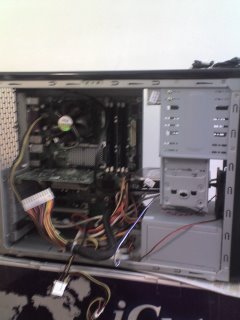
System during clean up
12:30 Cooked a veggie broth and had a quick lunch
13:00 My DVD writer was set as slave, conflicting with another IDE hard drive, reset it as IDE master. Voila, now they can play well together. Boy, the system is as hot as a radiator, too bad there is no winter in Malaysia.
14:30 Put everything back.
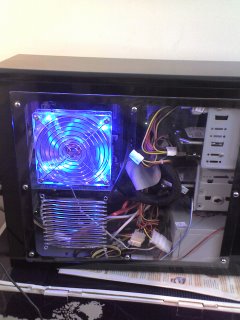 System after clean up (OK, still quite messy, untameable entropy)
14:45 Started to install Slackware 11.00
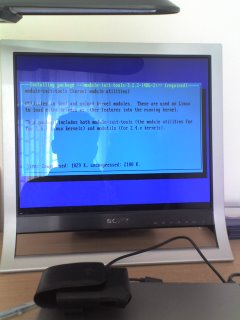 Package installation WIP
15:15 It is obvious the testers at slackware didn't test the packages on internationalization because many language packs are broken.
16:00 After I deselected the internationalization bundle everything ran fine.
17:00 Windows didn't boot properly, nvm, I went out hiking and decided to handle it after dinner
19:00 Had dinner. Windows failed to boot because after installation, the user has to manually toggle the boot flag through fdisk and reruns lilo to write the configurations back. Did that, reboot, Windows logo appeared.
19:15 I have a dual boot machine with XP and Slackware 11.00
11:30 Rolled my sleeves and cleaned up my PC. Reassembled the components to make it saner and to make myself happier.
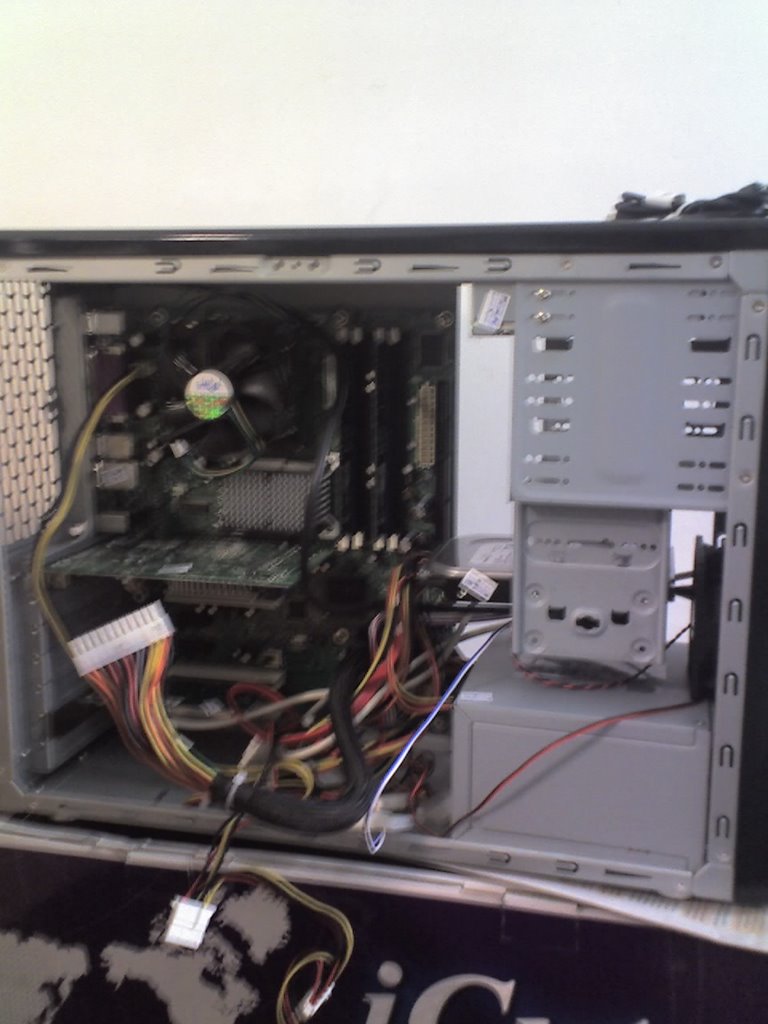
System before clean up

System during clean up
12:30 Cooked a veggie broth and had a quick lunch
13:00 My DVD writer was set as slave, conflicting with another IDE hard drive, reset it as IDE master. Voila, now they can play well together. Boy, the system is as hot as a radiator, too bad there is no winter in Malaysia.
14:30 Put everything back.
 System after clean up (OK, still quite messy, untameable entropy)
14:45 Started to install Slackware 11.00
 Package installation WIP
15:15 It is obvious the testers at slackware didn't test the packages on internationalization because many language packs are broken.
16:00 After I deselected the internationalization bundle everything ran fine.
17:00 Windows didn't boot properly, nvm, I went out hiking and decided to handle it after dinner
19:00 Had dinner. Windows failed to boot because after installation, the user has to manually toggle the boot flag through fdisk and reruns lilo to write the configurations back. Did that, reboot, Windows logo appeared.
19:15 I have a dual boot machine with XP and Slackware 11.00
Saturday, October 28, 2006
How to Lift a Rock and Hit Your Own Toes (Hard)
Again today is a fine Saturday, and again, I have nothing much to do. My little projects for the day will be to clean up my room (wipe the table, keyboard, desk lamp, and cabinets), move my new PC into place, and install back my favourite Linux distro. The main reason for the last project will be clarified in detail shortly.
 Clarification: The mug on the table contains Chinese tea, not beer (yet), and I am puzzled by the clarity of this picture: It looks too nice to be from my V3i.
While waiting all the live-updates to update themselves, I have been pondering upon this question: Will sane, educated, and presumably rational persons lift heavy, jaggeds rocks to hit their own toes? As metaphorical as this thinking goes, I have found a solid example these days when dealing with Microsoft Windows. I will take three issues of MS Windows as examples: overbloated registry, nasty spyware/adware, and rampant viruses.
Due to brain-dead designs, MS Windows (from 95 until XP SP2) stores all configuration information in a messy dumping ground called Registry. It is common to have registry file as large as hundred of megabytes for a heavily used machine (e.g. office machine). Since this file is growing because of buggy uninstall programs and/or continuous installation of new programs. Windows has to spend more and more time to parse this ever growing monster. As a direct consequence, performance of the machine is severely degraded (ah, this time Intel will approach and tell you Moore's law. Honey, time to upgrade!! Nice plot, right?). To address this issue, we need a tool to clean up the registry (highly impractical to clean up manually) with some sort of registry cleaner, say Registry Mechanic which costs AUD$49.95 (roughly USD$40) per seat. Fine, you dow out the dough and take the hit. Wait, don't sigh your relief yet, this is just the beginning.
Now, we have spyware/adware which typically are web-based programs that exploit vulnerabilities on crappy web browser (read: IE) and install nasty small programs into our PCs. Want to resolve this? Sure, I have found Ad-Aware from Lavasoft to be reasonably effective. The price tag for this starts at US$ 26.95. The good news now is we are kind of protected while surfing the net, the bad news is we are only kind of protected, not totally protected. No program in this world can give you 100% guarantee on its effectiveness, so we will need two programs from different vendors to increase the coverage. Again this will be USD$30-$50 of set back on our budget. The same rhetorics go to viruses on Windows platform and the anti-virus software associate with that.
The latest trend involves ubiquety of broadband access. The bright side is proliferation of information, but this also literally opens up most household computers to the world. Usually these computer owners aren't tech savvy and most have basic amount of IT knowledge. Understandably the OS of choice will be MS Windows, but the track record of Windows has been sordid. Given it is unreliable out of the box, solution? Personal firewalls with similar lines as the previous items. Pay up to get this issue alleviated (note, it indeed is alleviated, not eliminated)
After wrestling with these utilities for these days, I just feel like I have lifted a rock (the purchase of Windows) and hit my own toes hard (has been wasting time and energy to keep track of and clean the registry, viruses, firewall, etc.) The simple solution will be just reformat the hard drive and install Linux, however in order to play games that are only available on Windows, I have taken a compromise and allow my system to dual boot: my default system is Linux, but if I have a specific need that demands Windows, I will boot into Windows. Until now this is what I can do to reduce my headaches and regain some sanity. Isn't that a computer is a productivity tool to start with?
So Dear Reader, have you hit your toes today? (TM) (R)
 Clarification: The mug on the table contains Chinese tea, not beer (yet), and I am puzzled by the clarity of this picture: It looks too nice to be from my V3i.
While waiting all the live-updates to update themselves, I have been pondering upon this question: Will sane, educated, and presumably rational persons lift heavy, jaggeds rocks to hit their own toes? As metaphorical as this thinking goes, I have found a solid example these days when dealing with Microsoft Windows. I will take three issues of MS Windows as examples: overbloated registry, nasty spyware/adware, and rampant viruses.
Due to brain-dead designs, MS Windows (from 95 until XP SP2) stores all configuration information in a messy dumping ground called Registry. It is common to have registry file as large as hundred of megabytes for a heavily used machine (e.g. office machine). Since this file is growing because of buggy uninstall programs and/or continuous installation of new programs. Windows has to spend more and more time to parse this ever growing monster. As a direct consequence, performance of the machine is severely degraded (ah, this time Intel will approach and tell you Moore's law. Honey, time to upgrade!! Nice plot, right?). To address this issue, we need a tool to clean up the registry (highly impractical to clean up manually) with some sort of registry cleaner, say Registry Mechanic which costs AUD$49.95 (roughly USD$40) per seat. Fine, you dow out the dough and take the hit. Wait, don't sigh your relief yet, this is just the beginning.
Now, we have spyware/adware which typically are web-based programs that exploit vulnerabilities on crappy web browser (read: IE) and install nasty small programs into our PCs. Want to resolve this? Sure, I have found Ad-Aware from Lavasoft to be reasonably effective. The price tag for this starts at US$ 26.95. The good news now is we are kind of protected while surfing the net, the bad news is we are only kind of protected, not totally protected. No program in this world can give you 100% guarantee on its effectiveness, so we will need two programs from different vendors to increase the coverage. Again this will be USD$30-$50 of set back on our budget. The same rhetorics go to viruses on Windows platform and the anti-virus software associate with that.
The latest trend involves ubiquety of broadband access. The bright side is proliferation of information, but this also literally opens up most household computers to the world. Usually these computer owners aren't tech savvy and most have basic amount of IT knowledge. Understandably the OS of choice will be MS Windows, but the track record of Windows has been sordid. Given it is unreliable out of the box, solution? Personal firewalls with similar lines as the previous items. Pay up to get this issue alleviated (note, it indeed is alleviated, not eliminated)
After wrestling with these utilities for these days, I just feel like I have lifted a rock (the purchase of Windows) and hit my own toes hard (has been wasting time and energy to keep track of and clean the registry, viruses, firewall, etc.) The simple solution will be just reformat the hard drive and install Linux, however in order to play games that are only available on Windows, I have taken a compromise and allow my system to dual boot: my default system is Linux, but if I have a specific need that demands Windows, I will boot into Windows. Until now this is what I can do to reduce my headaches and regain some sanity. Isn't that a computer is a productivity tool to start with?
So Dear Reader, have you hit your toes today? (TM) (R)
Subscribe to:
Posts (Atom)